Turn inbound product into controlled inventory.
Receive against purchase, transfer, return, production, assembly, or configured inbound work and capture item, lot, serial, quantity, unit of measure, packaging, supplier, date, and condition.
AJAX WMS gives warehouse users fast, device-friendly workflows for receiving, GS1 labeling, SSCC serialization, lot and serial control, inventory movement, allocation, picking, shipping, cycle counting, correction, and proof while Business Central remains the financial inventory and posting system of record.
AJAX WMS is designed for real warehouse work: pallet identity, lot and serial control, expiration, bin visibility, reservations, staging, picking tags, relabeling, cycle counting, putback, shipment confirmation, and final ERP handoff.
Receive against purchase, transfer, return, production, assembly, or configured inbound work and capture item, lot, serial, quantity, unit of measure, packaging, supplier, date, and condition.
Create and print GS1 standards-based labels with SSCC, GTIN, lot, quantity, date, customer, order, and other configured application identifiers.
Scan source product and destination bin while preserving item, lot, quantity, status, ownership, user, device, location, and timestamp history.
Use open allocation, directed allocation, staging, or hard reservation while excluding held, expired, unavailable, or otherwise restricted inventory.
Scan each pallet, SSCC, lot, case, or configured picking tag so the warehouse can confirm the exact product, quantity, order, customer, and staging destination.
Coordinate allocation, picking, staging, loading, exceptions, short picks, replacement inventory, and reviewed shipment completion around the sales order.
Count by bin, item, lot, serial, pallet, location, or exception and route differences through controlled review and posting.
Manage putback, cancelled work, short picks, relabeling, replacement SSCCs, quantity changes, damaged product, and supervisor-approved correction.
The same item, lot, serial, date, SSCC, location, quality status, customer order, user, device, and posting reference can follow the product through every operational step.
Identify the document, supplier, item, quantity, lot, serial, date, packaging, condition, and receiving location.
Assign GS1 and SSCC identity, print labels, and connect the handling unit to its item, lot, quantity, and source.
Scan product and bins while preserving the exact warehouse location, status, ownership, and movement history.
Direct or validate the correct pallet, lot, quantity, customer, sales order, route, and picking tag.
Confirm staging, load assignment, carrier, trailer, shipment contents, exceptions, and departure readiness.
Capture proof, complete exceptions, confirm shipped inventory, and prepare reviewed Business Central posting.
AJAX WMS is designed to support FSMA 204 traceability workflows by connecting critical tracking information to receiving, transformation, movement, allocation, shipping, correction, and recall-oriented records. GS1 standards-based identifiers help keep product and logistics units consistent across labels, scans, customers, suppliers, and systems.
Connect product identity to the handling unit, supplier, customer, document, quantity, unit of measure, and inventory status.
Record where inventory was received, stored, moved, held, picked, staged, loaded, corrected, or shipped.
Connect each transaction to the user, device, time, document, notes, images, exception, approval, and posting result.
Customer configuration determines which data elements, event types, labels, retention rules, reports, and integration records are required.
| Operational Record | Connected Information |
|---|---|
| Receiving Events | Supplier, shipment, item, lot, quantity, date, location, and receiving references. |
| Transformation | Source lots, output lots, quantities, production order, packout, repack, regrade, and loss. |
| Shipping Events | Customer, sales order, shipment, item, lot, quantity, SSCC, carrier, load, and departure information. |
| Corrections | Replacement labels, putback, recount, adjustment, cancellation, exception, and approval history. |
Not every warehouse, location, customer, item, or user needs the same level of direction. AJAX WMS can apply different execution rules without forcing the entire operation into one rigid process.
Let experienced users choose valid inventory while AJAX confirms item, lot, status, quantity, location, customer, and availability.
Present recommended bins, pallets, lots, routes, priorities, sequencing, and replenishment based on configured rules.
Restrict fulfillment to designated pallets, SSCCs, lots, quantities, orders, customers, or staging work.
| Context | Control Options |
|---|---|
| Location | Use different control levels for plants, warehouses, coolers, yards, staging areas, or overflow sites. |
| Product | Apply additional validation for regulated, temperature-sensitive, high-value, expiring, or serialized products. |
| Customer | Enforce customer-specific lot, packaging, label, shelf-life, routing, staging, or proof requirements. |
| User Role | Separate scanner execution, supervisor correction, quality release, allocation, loading, and posting authority. |
| Exception | Route damaged, held, short, expired, mismatched, or unrecognized inventory into controlled review. |
AJAX WMS is intended for scanners, phones, tablets, laptops, and desktop browsers with clear prompts, large actions, barcode-first entry, role-based menus, and controlled exception handling.
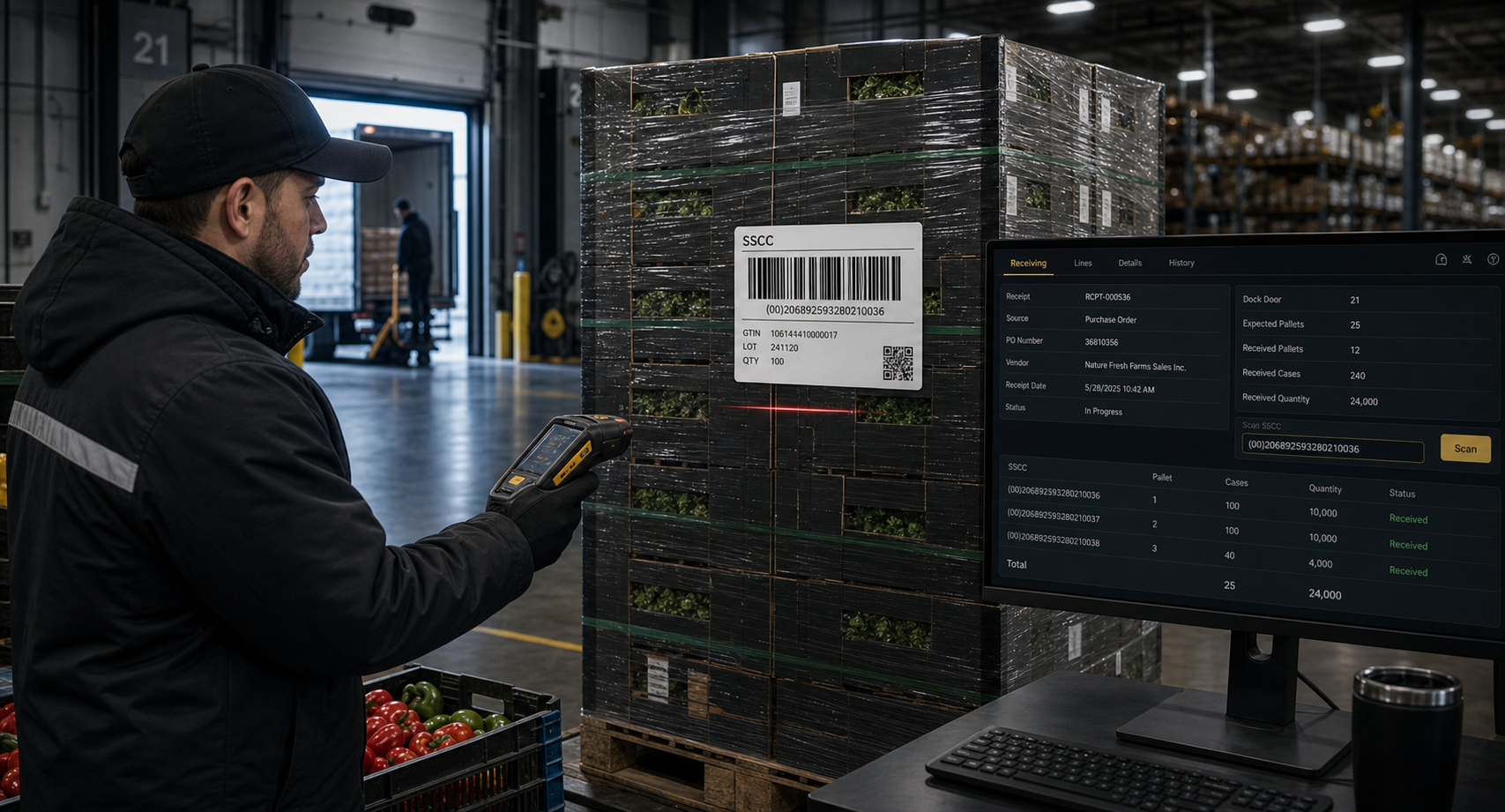 Receiving and Serialization
Capture inbound product, create SSCC identity, print GS1 labels, and make inventory available through one connected workflow.
 Correction Without Chaos
Handle putback, recounting, relabeling, replacement identity, short picks, and staged correction while preserving traceability.
AJAX OES applications are designed to reduce manual handoffs between warehouse, quality, transportation, customer service, finance, and executive reporting.
Audits, photos, holds, releases, grades, defects, claims, and rework can follow the same lot, SSCC, location, order, and customer.
View QMSTendered loads, carrier assignment, trailer, route, staging, loading, shipment proof, and delivery exceptions can share the same order and inventory data.
View TMSReceiving, pallet handling, storage, picking tags, correction, shipment, labour, and exception activity can help explain cost per sales order and item-level profit.
View ProfitabilityGrower, contract, field, lot, quality, inventory, packout, settlement, and shipment references can remain connected through the warehouse lifecycle.
View Grower ManagementAJAX WMS is not positioned as a replacement for Business Central financial control. It gives warehouse users the execution layer required to complete work quickly and sends reviewed results back when financial or inventory posting is required.
Warehouse users receive, label, serialize, move, allocate, pick, stage, load, inspect, count, correct, and capture proof on phones, tablets, scanners, laptops, and desktop browsers. Supervisors retain control over exceptions and final posting.
Purchase, sales, transfer, return, production, assembly, and configured warehouse work remain connected.
Items, variants, units of measure, lots, serials, expiration, locations, bins, and availability remain connected.
Reviewed receipts, shipments, consumption, output, movement, counts, and correction information can be prepared for posting.
Each AJAX OES tenant connects only to its authorized Business Central environment and company.
Connected execution data supports operational review, traceability, cost-to-serve analysis, and better communication between warehouse, quality, logistics, and finance.
Exact pallet identity, location, reservation, status, and task visibility help users complete work without avoidable investigation.
Device-friendly execution reduces direct ERP interaction while preserving governed posting and financial control.
Connect software fees, picking tags, sales orders, warehouse activity, labour, storage, correction, and shipping effort to cost-to-serve analysis.
SSCC history, scans, labels, images, notes, exceptions, user actions, and posting references remain connected.
Connected receiving, lot, movement, transformation, shipment, customer, and correction records support faster trace and recall-oriented investigation.
Shared records reduce repeated explanations, disconnected spreadsheets, and conflicting versions of what happened.
Estimate AJAX OES pricing, create a tenant, and begin guided setup without waiting for a consultation.
AJAX WMS is designed to support traceability, GS1 labeling, and FSMA 204-related operational workflows. Compliance depends on customer configuration, covered foods, supply-chain roles, required data elements, recordkeeping procedures, trading-partner participation, data quality, operating controls, retention, implementation, and legal or regulatory interpretation.
Final scope also depends on Business Central configuration, enabled applications, integrations, and customer-specific workflows.