See the real pallet choices
Review the physical SSCCs capable of satisfying demand instead of treating an item and lot as one undifferentiated inventory balance.
AJAX Allocation connects Business Central demand to the exact SSCC, pallet, lot, quantity, location, and quality-approved inventory capable of satisfying it. Planners and warehouse teams can evaluate eligibility before product is moved, staged, picked, or loaded.
AJAX Allocation gives planners and the warehouse the same pallet-level view, from eligibility through hard reservation and release to execution.
Review the physical SSCCs capable of satisfying demand instead of treating an item and lot as one undifferentiated inventory balance.
Evaluate variant, age, location, quality state, inspection history, customer rules, reserved quantity, and remaining availability before work is released.
Hard-reserve inspected, customer-sensitive, short-supply, or otherwise critical inventory so another pick cannot consume the exact pallet committed to the order.
Present the allocation before the driver travels, scans, stages, or loads product, reducing avoidable movement, putback, and correction work.
 Recommended and Eligible Pallets
Compare eligible SSCCs by item, lot, quality state, age, and location before a pallet is committed to the work.
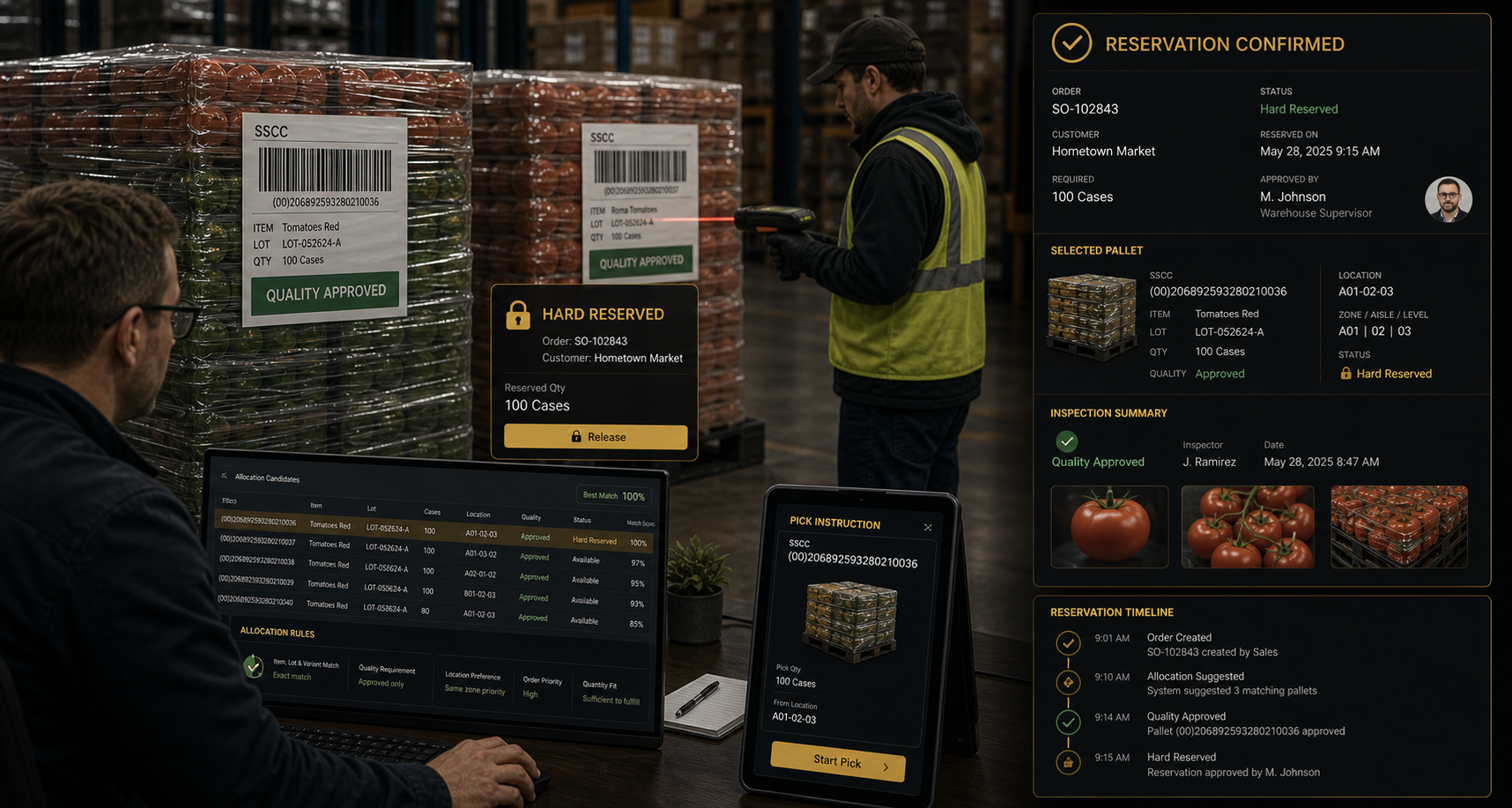 Hard-Reserved Pallets
Show which SSCC is hard-reserved, why it is protected, and which order it is committed to satisfy.
Lot-level availability is not always enough. Two pallets can share the same item and lot while differing in location, condition, inspection status, customer suitability, reserved quantity, product age, or operational priority. AJAX Allocation makes those differences visible before the warehouse commits labour.
Business Central remains the financial, order, and inventory system of record while AJAX OES controls the pallet-level operating decision.
Use recommended pallets when several choices are acceptable and hard reservation only when the customer or operation requires certainty.
Resolve pallet suitability before travel and staging instead of forcing the warehouse to discover the problem after work has already begun.
Confirm the pallet represents the correct item, variant, pack, unit of measure, or operational state required by the demand.
Apply lot requirements, product age, FIFO or FEFO rotation, expiration, and customer shelf-life expectations before release.
Keep held, failed, expired, damaged, or questionable inventory out of normal allocation while making approved inventory visible.
Consider warehouse, zone, bin, staged state, ownership, reserved quantity, open work, and remaining available quantity for each SSCC.
Apply customer-specific label, pack, grade, shelf-life, lot, quality, country-of-origin, route, or service requirements.
Consider order priority, route cutoff, promised date, customer commitment, product risk, and planned shipment sequence.
The best time to prevent an incorrect pick is before the lift truck travels, the pallet is staged, or the load is built. AJAX Allocation keeps demand, inventory eligibility, reservation, and the warehouse instruction connected.
Start with the Business Central sales order, transfer, production requirement, or other approved demand identifying item, quantity, date, and applicable rules.
Compare available pallets using item, variant, lot, age, location, quality, customer requirements, quantity, and operational priority.
Recommend the best eligible pallet or hard-reserve a specific SSCC when the operation requires certainty.
Present the decision to the warehouse user before movement, picking, staging, loading, or another controlled action.
Confirm the scanned pallet remains eligible and matches the order, reservation, lot, quantity, location, and status.
Keep the demand, recommendation, reservation, selected SSCC, user, time, exception, release, and final shipment connected.
Allow the warehouse to choose from a controlled set of eligible pallets when several choices satisfy the customer and operational rules.
Recommend the best available pallet using defined rotation, location, quality, quantity, and priority rules while retaining authorized exception handling.
Lock a specific SSCC to an order when inspection, customer commitment, product condition, scarcity, or another requirement demands certainty.
Make removal or replacement of a hard reservation a visible, role-controlled decision instead of an informal warehouse change.
Product availability changes. Pallets may be held, damaged, counted, moved, consumed, or made unavailable after the first recommendation. AJAX Allocation is designed to surface those changes and route the decision through controlled review.
Show that summarized inventory exists while no physical pallet currently satisfies all order and quality rules.
Prevent the same protected pallet or quantity from being committed to incompatible demand.
Remove or block inventory when a hold, failed inspection, expiration, damage, or other restriction changes eligibility.
Route changes in pallet, lot, variant, quantity, grade, or customer suitability to the appropriate authority.
Variant, lot, quality, quantity, and location visibility reduce the chance of presenting the warehouse with unsuitable product.
Customer-sensitive and inspected pallets can be protected before another order consumes the available inventory.
The allocation, reservation, release, user, order, and pallet can remain connected as part of the operational history.
Supervisors can see whether demand is covered by eligible physical inventory instead of relying only on a summarized lot balance.
AJAX Allocation can use warehouse availability, quality status, customer requirements, Business Central demand, and shipment timing while preserving the result for downstream execution and cost-to-serve analysis.
Connect allocation to SSCC identity, bins, movement, picking, staging, shipping, putback, and correction.
View WMSExclude held or failed product and protect approved, inspected, graded, or customer-specific inventory.
View QMSConsider route, load, staging, dock readiness, shipment timing, and customer delivery requirements.
View LogisticsConnect rehandling, substitution, exception labour, product loss, and service complexity to cost-to-serve analysis.
View ProfitabilityReduce lift-truck travel and repeated pallet movement caused by unsuitable product choices.
Prevent putbacks, reopened picks, substitutions, and manual supervisor intervention where possible.
Quality-approved product remains visible and protected for the customer or order it was intended to satisfy.
Customer requirements remain connected to the physical pallet ultimately selected, scanned, staged, loaded, and shipped.
AJAX OES calculates software and usage cost per sales order so the business can evaluate that operating expense beside product cost, labour, freight, margin, and other cost-to-serve inputs. Allocation supports that result by reducing unnecessary work inside each fulfillment cycle.
Reduce travel, second moves, putbacks, and repeated staging caused by unsuitable inventory choices.
Reduce reopened work, substitutions, manual investigation, and supervisor-led correction where possible.
Use AJAX OES cost per sales order as an operating-cost input alongside product cost, labour, freight, claims, and other profitability measures.
Allocation belongs inside execution, not in a separate planning spreadsheet disconnected from what the warehouse actually scans.
Capabilities shown on this page describe the intended AJAX OES allocation model and may include planned features.
Final availability and scope depend on Business Central setup, item tracking, SSCC data, quality status, customer rules, enabled applications, tenant configuration, and implementation.