Read approved operating references.
Items, variants, units, locations, bins, customers, vendors, dimensions, tracking rules, and configured extension fields.
AJAX extensions are intended to create a small, governed contract between Microsoft Dynamics 365 Business Central and AJAX OES. Business Central remains responsible for master data, documents, posted inventory, cost, and financial control while AJAX OES manages fast, device-driven execution and operational proof.
Do not rebuild Business Central inside AJAX OES, and do not force every floor action through the ERP. Move only the minimum approved data needed to execute work, preserve operational detail, and return reviewed posting-ready results.
A focused contract reduces duplicate logic, broad permissions, uncontrolled writes, fragile customizations, and unnecessary upgrade exposure.
Items, variants, units, locations, bins, customers, vendors, dimensions, tracking rules, and configured extension fields.
Purchase, sales, transfer, return, production, assembly, warehouse, and other approved operational documents.
Keep Business Central tracking requirements connected to the AJAX OES pallet and transaction history.
Units per pallet, handling classification, operational flags, food attributes, packaging defaults, or other governed settings.
Queue receipt, shipment, consumption, output, count, movement, correction, and supporting references for authorized processing.
Show active profile, company mapping, last successful exchange, pending work, failures, retries, and diagnostic detail permitted to the tenant administrator.
Use stable references, statuses, and approved retry rules so the same execution result is not unintentionally posted more than once.
Preserve tenant, profile, environment, company, document, line, AJAX transaction, user, time, queue, and posted references.
The same company, document, line, item, lot, operational result, approval, queue, posted reference, error, retry, and final status can remain connected through the complete integration lifecycle.
Retrieve approved company, master, document, line, quantity, lot, serial, dimension, and status information.
Perform receiving, serialization, movement, picking, quality, loading, correction, or other enabled work in AJAX OES.
Validate quantity, item, lot, order, exception, proof, approval, and posting readiness before financial handoff.
Send the approved summary through the configured extension or API contract for authorized Business Central processing.
Capture the Business Central result, posted reference, error, retry, rejection, and final integration status.
The AJAX platform does not share one global Business Central connection. Tenant administrators configure their own saved connection profiles, and only one approved profile is active for operational exchange at a time.
Configure the tenant, environment, company, OAuth application details, permissions, and test status required by the customer’s setup.
Configure the server, instance, base URL, company, authentication method, network requirements, and customer security controls.
Use a controlled development profile for extension, API, event, data, posting, and error-path testing.
Saved profiles can represent development, sandbox, or production. Deliberate activation helps reduce the risk of sending test work to the wrong company.
| Control | Required Context |
|---|---|
| Profile | Friendly connection name, connection type, authentication type, environment, and current status. |
| Endpoint | Base URL, server instance, environment name, API location, or other applicable endpoint information. |
| Company | Business Central company identifier, company name, tenant mapping, and approved operational scope. |
| Authentication | OAuth or another supported customer-approved method, with secrets protected from ordinary users. |
| Activation | One active profile per tenant, with explicit selection, connection testing, and production safeguards. |
| Diagnostics | Permission checks, company access, API response, extension availability, queue status, and errors. |
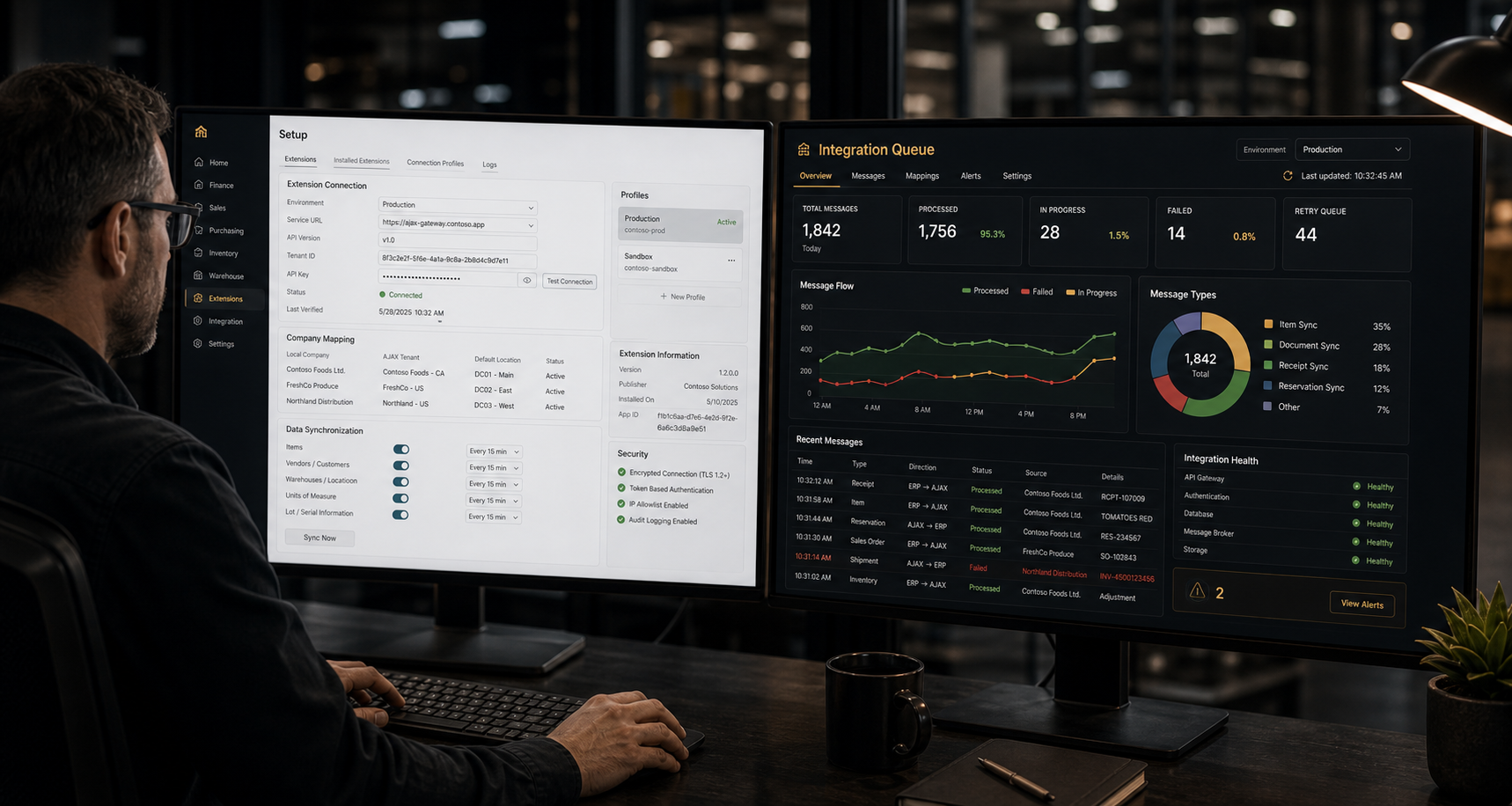 Extension Setup and Queue Visibility
Review company connection, enabled contract version, permissions, pending work, failures, retry status, and posted Business Central references.
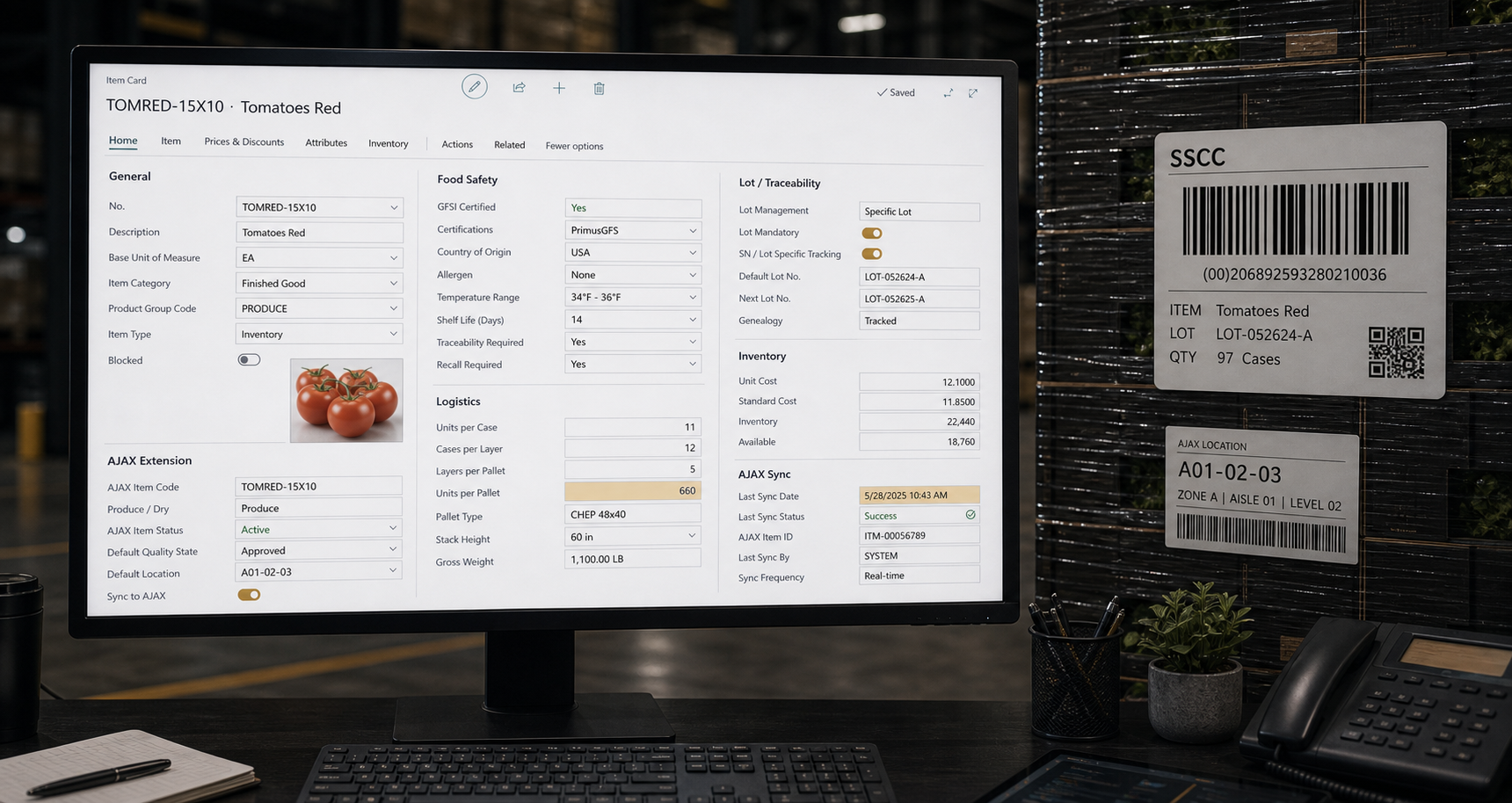 Item and Food Attributes
Expose produce or dry-goods classification, units per pallet, catch weight, storage guidance, handling rules, and enabled AJAX behaviour.
Some capabilities live primarily in AJAX OES and require only a small Business Central field, API, page, event, or reference. These categories describe the intended commercial and integration scope rather than promising that every function belongs inside the Business Central extension.
Tenant-controlled profiles, company mapping, connection status, API checks, environment separation, and queue visibility.
Value: reduce manual re-entry while keeping the integration controlled and supportable.
Units per pallet, produce or dry-goods classification, catch-weight support, storage notes, handling rules, and AJAX application settings.
Value: product-specific rules follow the item into receiving, storage, picking, quality, and shipment.
SSCC creation references, received-tag activation, daughter tags, replacement labels, label history, and print-queue control.
Value: pallet-level quantities remain tied to a scannable execution identity.
View WMSPosted or approved receipt quantities become pending AJAX serialization work with pallet projections, packaging defaults, and operator adjustments.
Value: operational identity remains linked to the authorized Business Central receipt.
Item, lot, vendor, receipt, SSCC, location, movement, pick, putback, customer, and shipment references remain connected.
Value: investigation can begin from the lot, pallet, customer, receipt, order, or movement history.
Quality status, inspections, images, condition changes, customer rules, release decisions, and disposition references remain tied to exact inventory.
Value: questionable product can be controlled without hiding unrelated usable inventory.
View QMSReadings, logger references, carrier checks, trailer conditions, exceptions, images, and load proof remain tied to shipment records.
Value: cold-chain evidence remains connected to the customer, load, product, and document package.
View LogisticsGo-live counts, ongoing differences, review, acknowledgment, correction evidence, and Business Central adjustment support.
Value: improve inventory confidence without making every count a disruptive ERP process.
Picked and staged inventory, dock context, driver, documents, signatures, images, shipment proof, and delivery references.
Value: customer-facing proof reflects what AJAX OES knew when the shipment was prepared.
Customer exchange, document readiness, ASN, BOL, POD, validation, message status, and execution-backed proof.
Value: partner documents can be supported by actual receiving, pick, load, and delivery events.
View EDIRole permissions, training readiness, browser-device controls, user history, approvals, tenant settings, and support diagnostics.
Value: show who was authorized, trained, active, and responsible for each operational result.
Business Central costs and dimensions combine with AJAX freight, labour, storage, handling, quality, shrink, claims, and operational allocation detail.
Value: preserve the financial source while explaining operational margin.
View ProfitabilityConnection testing should confirm more than a successful sign-in. Review the active tenant, environment, company, extension contract, permissions, and posting path before a profile is activated.
Display Online, On-Premises, or development-container context together with the environment name, server instance, and connection status.
Validate company identifier, company name, tenant mapping, permissions, and the operational scope AJAX OES may use.
Check the installed contract version, exposed pages, events, permissions, fields, queues, and supported posting paths.
Confirm authentication, company access, master data, document visibility, and extension availability before enabling posting or queue submission.
Preserve the previous profile, show the proposed replacement, identify the user, and record the activation time and result.
Clearly label production connections and require appropriate authorization before live transaction or posting activity is enabled.
Business Central setup remains an administrative function with tenant isolation, deliberate activation, secret protection, documented permissions, and an auditable handoff.
Users must have active membership in the selected tenant before viewing or changing its profiles, company mapping, diagnostics, or queue information.
Connection profiles, credentials, activation, extension checks, and company selection remain limited to authorized tenant administrators and support processes.
Client secrets, passwords, tokens, and sensitive connection material should be protected, masked, and excluded from routine support output.
Separate development, sandbox, and production profiles, require explicit selection, and show the active environment before execution or posting.
Use documented extension permissions and APIs rather than broad access that exceeds the tenant’s approved integration scope.
Record source, queue, attempt, response, error, retry, approval, posted document, and final result for supported transactions.
Validate item, company, document, lot, reservation, receipt, shipment, queue, authentication, and failure paths against a development environment.
Move only required fields, APIs, pages, events, permissions, and references into the production extension package.
Let tenant administrators configure, test, and activate their approved sandbox or production profile with guided diagnostics.
Prepare publisher details, versioning, validation, security, privacy, documentation, upgrade, support, and marketplace requirements before publication.
AJAX OES pricing is designed so the Business Central integration application can be estimated together with WMS, QMS, Logistics, EDI, Profitability, Grower Management, and other selected applications.
The public pricing page reads the active Business Central integration application price configured by AJAX Software.
Phones, tablets, scanners, laptops, workstations, and browser devices are not intended to create separate Business Central integration licence charges.
The selected application fee contributes to the AJAX OES monthly software total and resulting cost per sales order.
A small, governed integration contract supports a cleaner floor experience, reviewed posting, and a supportable extension architecture.
Device-friendly AJAX OES workflows can reduce direct ERP access while keeping master, document, inventory, and posting references connected.
Posting-ready queues and traceable references help separate fast execution from authorized Business Central inventory and financial updates.
A focused extension reduces duplicate logic, broad permissions, fragile customizations, and unnecessary upgrade exposure.
Estimate AJAX OES pricing, create a tenant, and complete the guided connection, company, permission, extension, and environment checks required before activation.
Capabilities shown on this page describe the intended AJAX OES and Business Central integration architecture and may include planned extension packages.
Final availability and scope depend on the customer’s Business Central version, deployment type, licensing, enabled features, company setup, APIs, extensions, permissions, authentication, network, security approval, third-party customizations, testing, and implementation requirements. Microsoft Dynamics 365 Business Central and related Microsoft product names are trademarks of their respective owner.