Use camera, touch, and mobile browser workflows.
Suitable for approved receiving, inspection, image, signature, messaging, delivery, lookup, and light scanning processes where the device is appropriate.
AJAX OES is designed for modern browser access from phones, tablets, laptops, desktops, and browser-capable scanners. Device flexibility reduces hardware lock-in, while tenant, user, role, location, application, session, and device rules control what each person is permitted to see and do.
AJAX OES is intended to reduce the requirement for one proprietary handheld across every process. Customers can choose devices based on durability, scanning, battery, camera, screen, printer, environmental, support, and cost requirements.
Suitable for approved receiving, inspection, image, signature, messaging, delivery, lookup, and light scanning processes where the device is appropriate.
Useful for quality, receiving, production, dock, supervisor review, customer proof, training, and shared-station scenarios.
Use the full browser experience for tenant setup, Business Central connections, queues, reporting, approvals, diagnostics, and operational control.
Support scanner-style browser sessions for high-volume receiving, movement, picking, counting, putback, labeling, and shipping workflows.
Assign station identity, location, purpose, device mode, default printer, and permitted workflow while preserving user-level authentication.
Use tenant, location, station, user, role, workflow, item, label, or task context to select configured printers and print queues.
Use supported cameras for quality images, damage, labels, documents, delivery proof, temperature, signatures, and exception evidence.
Standardize rugged scanners where required, but avoid purchasing specialized hardware for every user before the workflow and operating need are proven.
Device identity, approval, configuration, activity, user, location, sessions, status, and retirement history can remain connected throughout the device lifecycle.
Record the station or device name, tenant, location, mode, intended use, browser context, and assigned owner or shared purpose.
Confirm whether the device may be used for mobile, desktop, scanner, kiosk, proof, printing, or another configured access mode.
Apply location, workflow, printer, session, application, camera, scanner, and supported browser settings.
Review last activity, current status, user, location, sessions, failed access, printer use, and applicable audit events.
Revoke approval, sign out active sessions, remove assignments, clear sensitive configuration, and preserve the required audit history.
AJAX OES access is intended to be evaluated using multiple layers rather than assuming that possession of a device grants operational authority.
Users must have active membership in the selected tenant before viewing its private pages, devices, applications, records, settings, or connections.
Separate platform administration, tenant administration, warehouse execution, supervisor, quality, transportation, approval, and support roles.
Control access to WMS, QMS, Logistics, EDI, Messaging, Training, Grower Management, Profitability, administration, and configured extensions.
| Access Layer | Evaluation Context |
|---|---|
| Tenant | Active membership, tenant status, selected company, and strict separation from other tenants. |
| User | Identity, sign-in status, active state, scanner-user designation, assigned role, and permitted actions. |
| Location | Facility, warehouse, cooler, yard, dock, production area, route, office, or other configured scope. |
| Device Mode | Mobile, desktop, scanner, shared station, printer station, kiosk, proof-capture, or another approved usage mode. |
| Application | Enabled module, page, workflow, product area, and transaction authority assigned to the user. |
| Record State | Ownership, status, hold, approval, assignment, customer, item, lot, location, or workflow condition. |
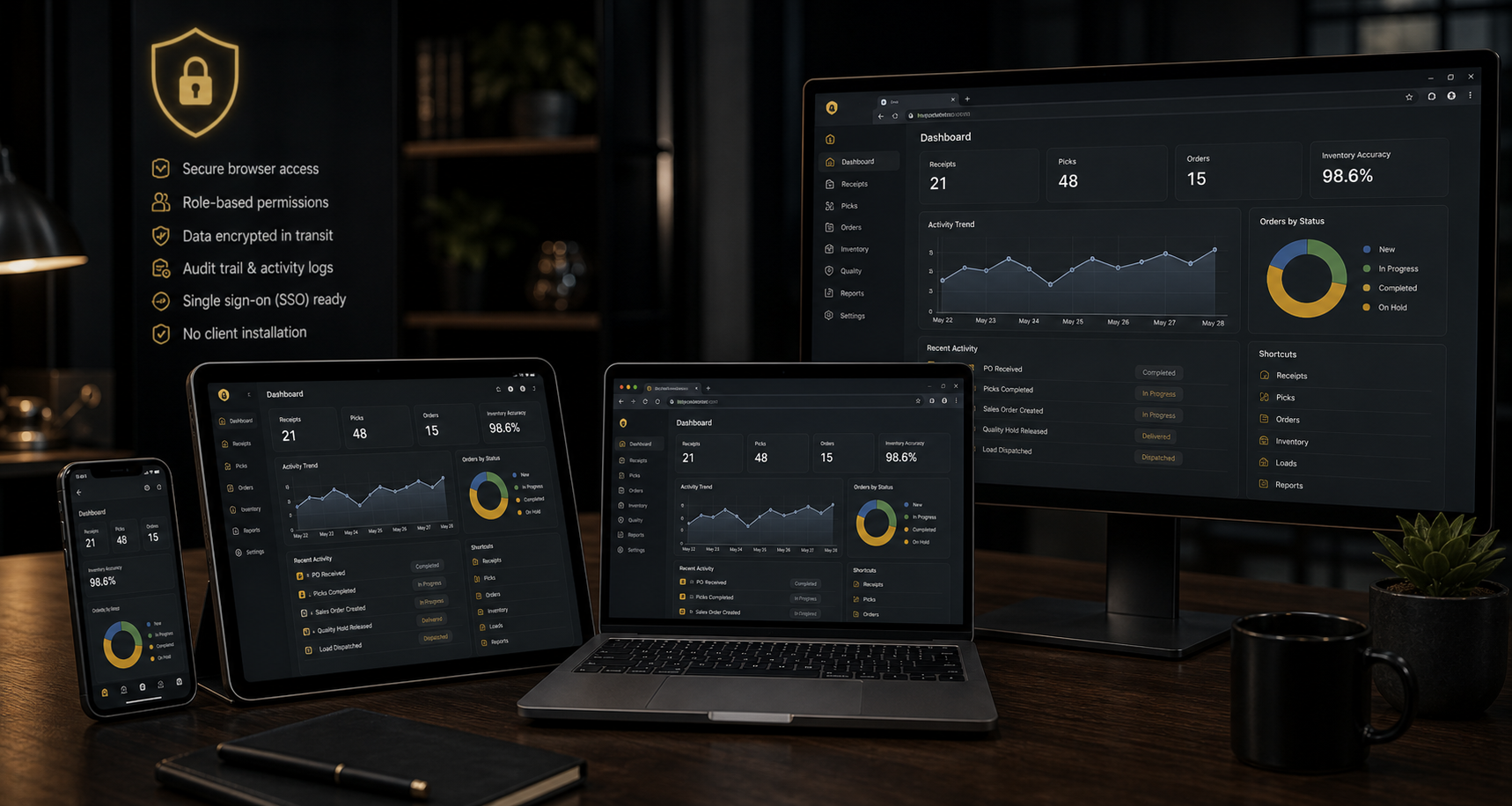 One Application Across Device Types
Use workflows designed for the screen, scanning method, camera, keyboard, touch input, and operational purpose of the approved device.
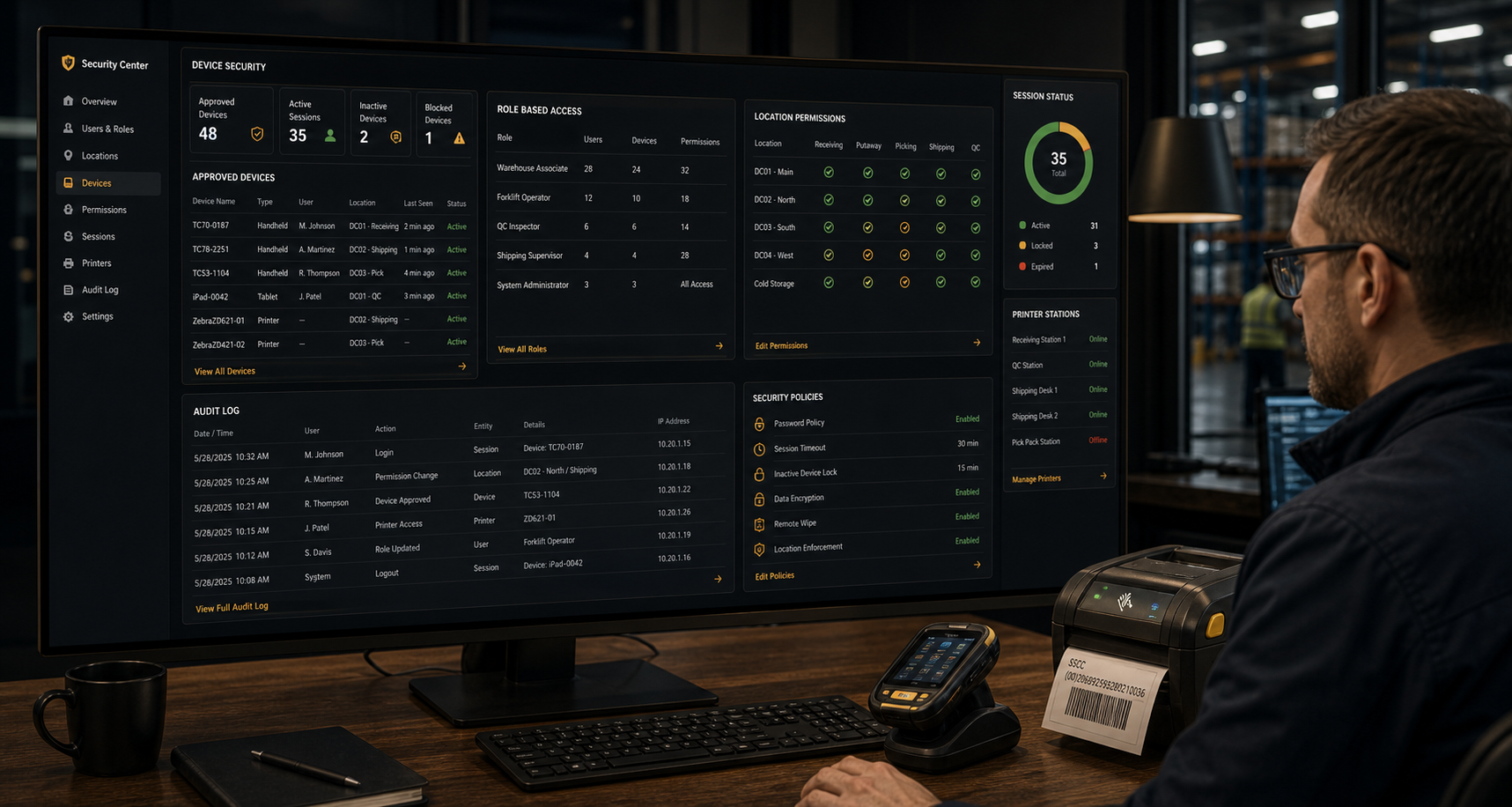 Device, User, Session, and Audit Visibility
Review approved devices, assigned users, location, access mode, last activity, active status, permission, printer configuration, and relevant security events.
Operational environments may use shared scanners, tablets, kiosks, and print stations. AJAX OES is intended to support controlled shared-device workflows without removing individual accountability.
Even on a shared device, operational transactions should be associated with the authenticated user and active tenant context.
Use configured inactivity, sign-out, reauthentication, and session rules appropriate to the workflow and customer security requirements.
Where one identity belongs to more than one tenant, require an explicit active-tenant choice before private operational access.
Customer policy should address saved passwords, shared accounts, browser profiles, device lock, autofill, and local credential storage.
Disable the user or device, revoke permitted access, terminate applicable sessions, and preserve the audit history required for investigation.
Use configured station, tenant, location, workflow, printer, and label permissions with visible queue and failure status.
Customer device management should keep browsers, operating systems, scanner services, certificates, and required security updates current.
Avoid exposing secrets in page content, local files, browser storage, screenshots, downloads, logs, or shared-device configuration.
Device context should support the workflow without replacing tenant, user, role, application, and record-level authorization.
Receiving, serialization, movement, allocation, picking, staging, shipping, cycle counting, putback, and correction can use approved browser devices.
View WMSPhones and tablets can support measurements, photos, grading, holds, releases, signatures, and corrective actions when the device is suitable.
View QMSApproved devices can support check-in, appointments, loading, temperature evidence, signatures, exceptions, and proof of delivery.
View LogisticsUsers can receive assignments, ask questions, review procedures, acknowledge updates, and complete readiness checks from the permitted device.
View MessagingApplication controls and customer device management must work together. Browser access alone does not transfer device, network, physical-security, or compliance responsibilities to AJAX OES.
Browser-capable does not automatically mean warehouse-ready. Each proposed device should be tested against the workflows, peripherals, environmental conditions, and support model required by the customer.
Test symbologies, prefixes, suffixes, focus behaviour, keyboard emulation, rapid scans, duplicate scans, camera scanning, and error recovery.
Test permissions, image quality, orientation, file size, low-light conditions, upload reliability, and customer retention requirements.
Confirm printer selection, station defaults, queue status, label dimensions, barcode quality, reprints, and failure recovery.
Review screen size, touch targets, physical keyboard, trigger placement, brightness, readability, and one-handed use.
Confirm wireless coverage, roaming, reconnect behaviour, latency, proxy or VPN requirements, certificates, and expected outage handling.
Evaluate drops, moisture, dust, temperature, battery, charging, mounting, cleaning, vehicle use, and any applicable hazardous-location requirements.
Review configuration, source, deployment settings, browser storage, logs, documents, screenshots, and support notes for exposed passwords, tokens, keys, or connection strings.
Review platform admins, tenant admins, warehouse users, scanner users, disabled accounts, inactive memberships, support access, and high-authority permissions.
Confirm active endpoints, tenant selection, Business Central profiles, Stripe mode, email settings, storage, domains, certificates, and production-data boundaries.
Review device names, locations, modes, users, shared purpose, browser support, scanner behaviour, printers, and queue routing.
Confirm that users cannot reach private pages after sign-out, membership removal, account disablement, or loss of required authorization.
Test user, tenant, time, device or station, record, action, approval, correction, integration, and error references for supported workflows.
Validate the workflow first, keep device context visible, and standardize rugged hardware only where the proven operating need justifies it.
Use approved existing devices for signup, setup, training, receiving, movement, picking, quality, transport, messaging, and administration where suitable.
Station, user, location, mode, printer, activity, status, and permission context can give support a clearer starting point.
Move high-volume or harsh-environment workflows to rugged equipment while keeping lower-intensity tasks on practical browser-capable devices.
Estimate AJAX OES pricing, create a tenant, and validate the devices, browsers, scanners, cameras, printers, sessions, permissions, and locations required by the operation.
Capabilities shown on this page describe the intended AJAX OES browser-device and application-security model and may include planned features.
Final device compatibility and security depend on the customer’s hardware, browser, operating system, scanner, printer, camera, network, identity, endpoint management, policies, configuration, enabled AJAX applications, and implementation requirements. Browser access alone does not make a device secure or suitable for warehouse, safety-critical, regulated, outdoor, refrigerated, or hazardous environments. Customers remain responsible for validating device fitness, physical protection, network security, legal obligations, and operational policy.