Receive structured customer or partner demand.
Accept supported orders, forecasts, releases, transfers, appointments, or replenishment messages and route them through controlled validation and review.
AJAX EDI connects customer, supplier, carrier, grower, and trading-partner documents to the same orders, pallets, lots, loads, inspections, images, signatures, exceptions, and Business Central records used by the operation.
Document creation, validation, exchange, acknowledgment, exception review, and final proof can remain tied to the source transaction instead of being rebuilt from separate warehouse screens, emails, spreadsheets, carrier portals, and paper records.
Accept supported orders, forecasts, releases, transfers, appointments, or replenishment messages and route them through controlled validation and review.
Generate acknowledgments, confirmations, changes, substitutions, shortages, dates, quantities, and partner references from validated operational and ERP data.
Connect orders, loads, SSCCs, pallets, lots, quantities, packaging, labels, dates, carrier data, and shipment milestones to the outbound notice.
Use Business Central invoices, credits, returns, shipments, claims, deductions, taxes, and financial references where partner flows require them.
Exchange supported load tenders, responses, appointments, shipment status, route milestones, delivery proof, and freight documents with approved partners.
Validate identifiers, quantities, dates, addresses, units, lots, SSCCs, references, and required partner fields before sending.
Preserve 997, 999, TA1, and other supported technical acknowledgment status without treating those technical acknowledgments as additional billable business documents.
Surface mapping errors, missing data, rejected messages, quantity differences, late documents, duplicates, unacknowledged messages, and partner-specific issues.
The same partner, transaction type, source document, order, shipment, pallet, lot, invoice, acknowledgment, exception, retry, and final status can remain connected through the complete EDI lifecycle.
Start from a partner message, approved ERP document, warehouse event, load milestone, delivery proof, or configured schedule.
Check identifiers, required fields, data types, quantities, dates, references, and supporting status.
Map AJAX OES and Business Central data into the agreed partner format, version, and transaction structure.
Send or receive through the configured connection and preserve transmission, direction, retry, and error history.
Track technical and business acknowledgment status, partner acceptance, rejection, and required follow-up.
Review exceptions, correct approved data, resend when permitted, and keep the final document tied to its proof.
Customers, suppliers, growers, carriers, marketplaces, and integration partners may require different identifiers, standards, versions, timing, labels, acknowledgments, and connection methods.
Support customer-specific demand, acknowledgment, shipment, delivery, return, claim, deduction, and financial document requirements.
Support purchase, contract, shipment, receiving, grade, claim, settlement, or supporting-document exchange where configured.
Exchange supported tender, response, appointment, tracking, temperature, proof, exception, invoice, and delivery data with approved partners.
| Rule Area | Partner Configuration |
|---|---|
| Partner | Configure sender, receiver, account, location, customer, supplier, grower, carrier, and routing identifiers. |
| Transaction | Define supported inbound and outbound document types, standards, versions, required fields, and business rules. |
| Timing | Trigger immediately, on approval, on schedule, after posting, after loading, or after delivery proof. |
| Validation | Require references, lot detail, SSCCs, quantities, labels, addresses, proof, or financial status. |
| Exception | Route rejected, late, duplicate, incomplete, mismatched, retried, or unacknowledged messages into review. |
Transmission status alone does not explain what happened. AJAX EDI is designed to preserve the source document, operational evidence, mapping result, acknowledgment, exception, correction, and retry history together.
 Document Control Center
Review partner, transaction, direction, source record, created time, transmission status, acknowledgment, validation result, and current exception state.
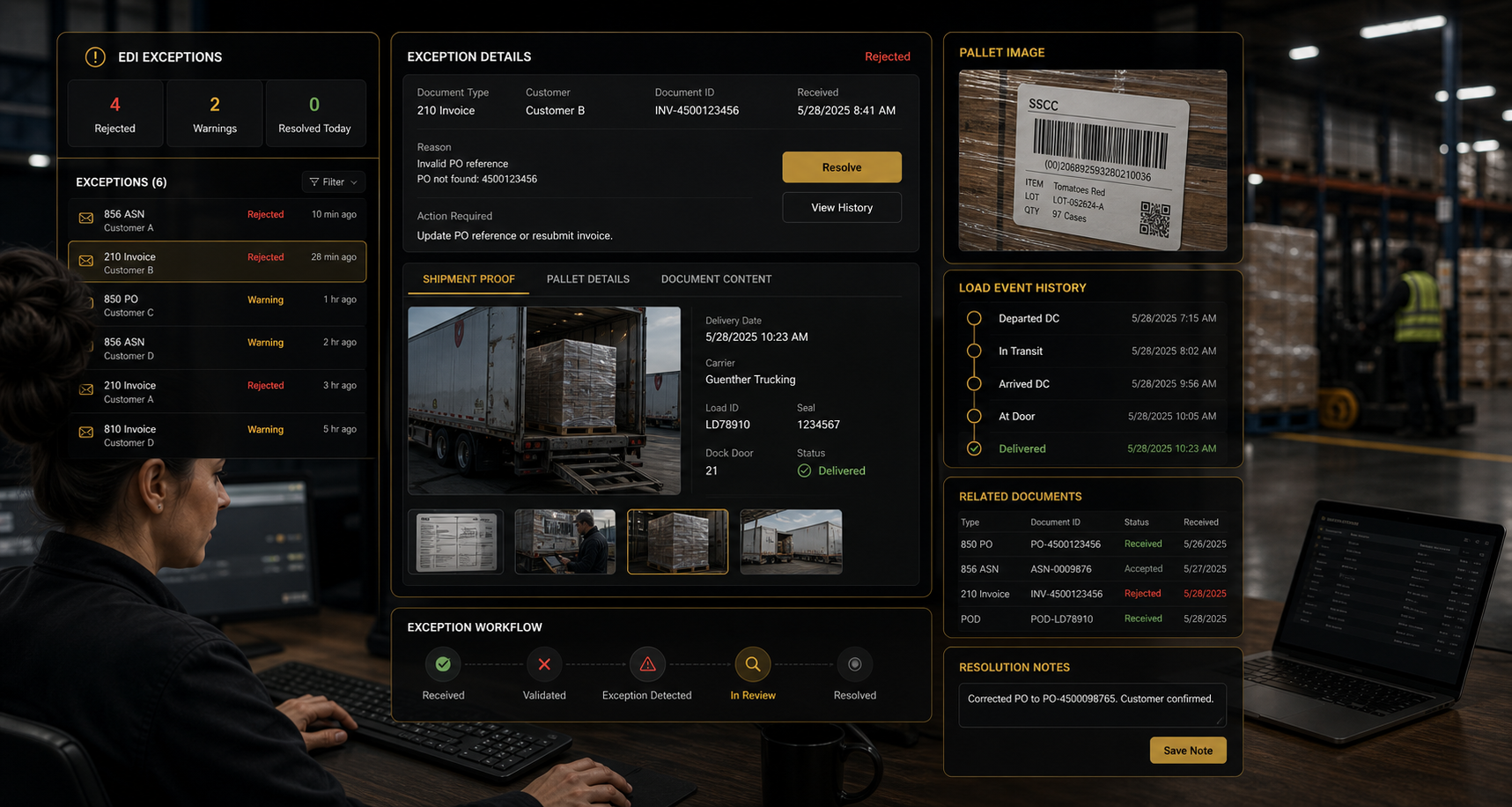 Exception Review With Operational Proof
Compare the rejected or incomplete document with the actual order, SSCC, lot, load, image, signature, inspection, shipment event, and delivery evidence.
AJAX OES applications are designed to preserve the relationship between the exchanged business document and the operational or financial event that created it.
Received, serialized, allocated, picked, staged, loaded, counted, corrected, and shipped inventory can support order and ASN detail.
View WMSCarrier, tender, appointment, dock, load, route, departure, temperature, delivery, signature, and exception data can support transportation exchange.
View LogisticsAudit results, holds, releases, grades, photos, certificates, claims, and disposition evidence can be connected to exchanged documents.
View QMSBusiness-document volume, partner complexity, manual correction, chargebacks, claims, and customer-specific requirements can support cost-to-serve analysis.
View ProfitabilityBusiness Central can provide authorized customer, vendor, item, order, receipt, shipment, return, invoice, credit, tax, and financial references while AJAX OES contributes the operational execution and evidence required by the partner flow.
AJAX OES can manage supported business documents while preserving their relationship to warehouse, quality, logistics, grower, and delivery records.
Customers, vendors, items, units of measure, locations, addresses, dimensions, and partner identifiers remain connected.
Purchases, sales, transfers, returns, receipts, warehouse shipments, production, and posted shipment references remain available.
Invoices, credits, taxes, deductions, claims, payment references, and posted financial results remain connected.
Each AJAX OES tenant connects only to its authorized Business Central environments, companies, and configured trading relationships.
AJAX EDI pricing separates the recurring application fee from measurable document activity. The current public pricing estimator uses successful business documents sent or received as the EDI usage driver.
Examples may include acknowledgments, confirmations, advance ship notices, invoices, credits, status documents, tenders, and other supported partner messages.
Examples may include orders, releases, forecasts, tender responses, claims, shipment information, and other supported partner documents.
Technical acknowledgments such as 997, 999, and TA1 are included at no additional charge and are not counted as separate billable business documents. Failed validations, unsuccessful transmissions, retries, testing traffic, and partner-specific edge cases are governed by the applicable service configuration and commercial terms.
Connected source records give operations, integration, finance, and service teams one document history for exchange, exception, evidence, and commercial review.
Teams spend less time rebuilding order, receipt, shipment, load, delivery, and financial information from separate systems and paper.
SSCCs, lots, scans, photos, signatures, inspections, timestamps, load history, and delivery evidence remain connected.
Validation, acknowledgment, retry, correction, ownership, and final status provide a clearer path to resolution.
Required identifiers, quantities, dates, references, labels, SSCCs, shipment detail, and proof can be reviewed before transmission.
Document volume, mapping requirements, exceptions, corrections, claims, and manual support can help explain customer and sales-order cost.
Shared source records reduce repeated explanations, disconnected logs, and conflicting versions of partner status.
Estimate AJAX OES pricing, create a tenant, and begin guided setup without waiting for a consultation.
AJAX EDI capabilities shown on this page describe the intended integration application and may include planned features.
Final availability and scope depend on partner requirements, supported standards and versions, connection methods, external providers, security approval, Business Central configuration, mapping, testing, certification, transaction volume, enabled applications, and implementation. Successful exchange also depends on trading-partner participation and data quality.